Postgres GUI for your Mac with local or cloud text-to-SQL
Widen is a free, open-source, native macOS Postgres GUI. Its agents search your schema, draft SQL, and verify it against PostgreSQL before it reaches your editor.
On-device AI on macOS 26+ only
Text-to-SQL that verifies itself
Search. Draft. Verify. Run.
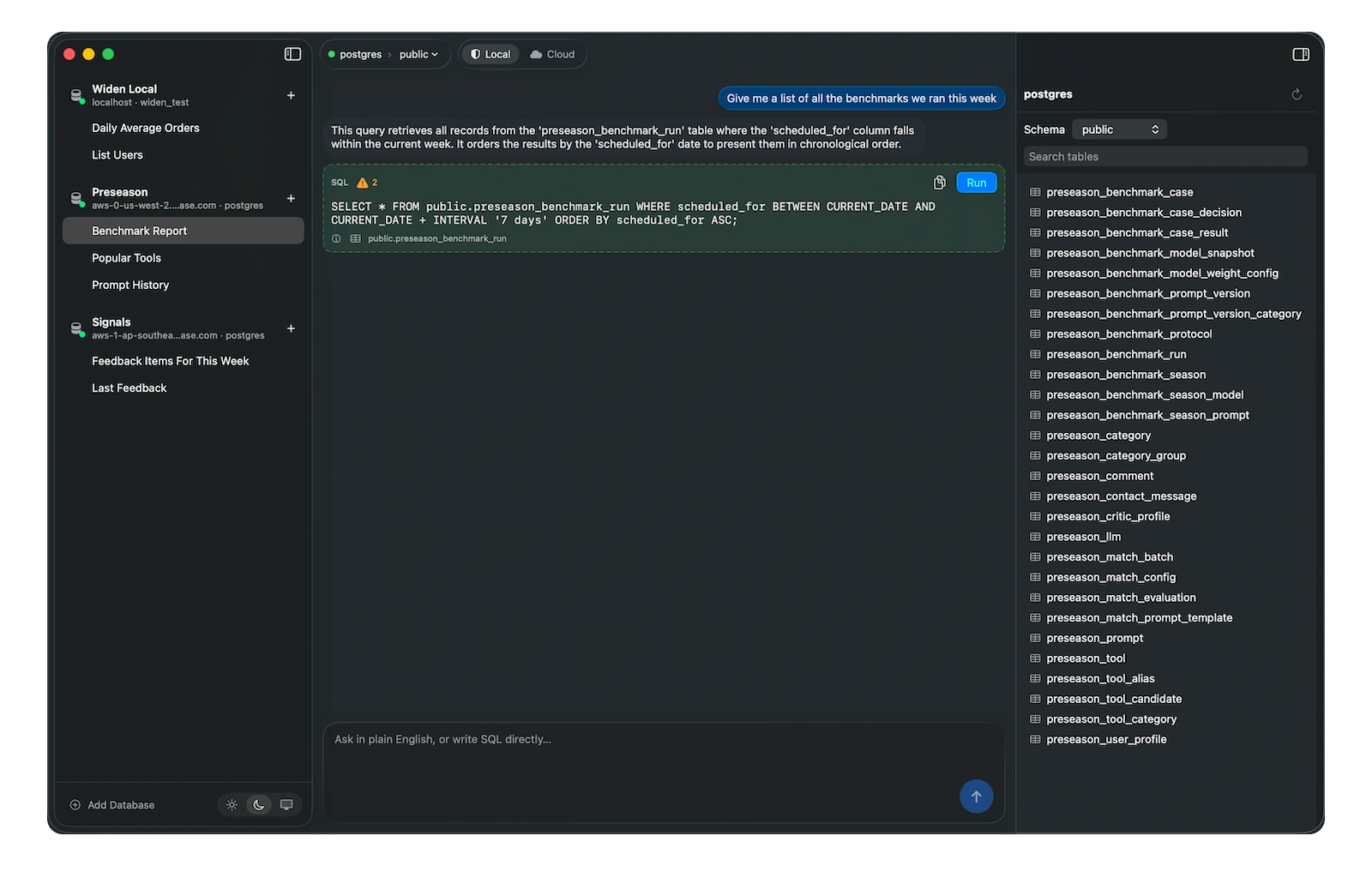
Instead of dumping your whole schema into one prompt, Widen's agents search your schema, call only the tables they need, draft SQL, and verify it against PostgreSQL before it reaches your editor. If it doesn't parse, they get one repair — then stop.
- Verified before run
- Review-before-run
- On-device or cloud
- No account
- MIT
Which users have spent the most?
SELECT u.name, SUM(o.total_cents) / 100.0 AS spent
FROM users u
JOIN orders o ON o.user_id = u.id
GROUP BY u.name
ORDER BY spent DESC
LIMIT 5| name | spent |
|---|---|
| Ada Lovelace | $482.50 |
| Grace Hopper | $391.00 |
| Alan Turing | $274.20 |
| Katherine Johnson | $168.75 |
Ask in plain English
Type a question. Widen's agents search your schema for the right tables and columns, draft SQL with an explanation and confidence, and verify it against Postgres before showing you.
- Agents discover the schema themselves — no giant context dump
- SQL is verified against PostgreSQL before it reaches your editor
- One repair if it doesn't parse, then it stops
- Or write raw SQL yourself when you don't need the agents
- Persistent sessions that survive restarts
- On-device model · macOS 26
- Cloud · your OpenRouter key
- Results stay on your Mac
On your Mac, or in the cloud
Run the model that ships on your Mac for fully offline SQL, or bring your own OpenRouter key to use any frontier model — open or closed. Your query results never leave your Mac either way.
- On-device mode on macOS 26 — no network except your Postgres
- Cloud mode with your own OpenRouter API key, any model
- Cloud-only on older macOS
- Passwords and API keys live in the macOS Keychain
- No backend, no accounts, no analytics
UPDATE public.orders
SET status = 'archived'
WHERE id = 42;A focused Postgres workbench
Connect your Postgres databases, browse schemas, keep sessions, and run SELECT, INSERT, UPDATE and DELETE from one native Mac app.
- One native app for local and remote Postgres databases
- Ask for SQL or write it yourself, review the statement, then choose whether to run it
- Single-statement validation before execution
- Timeouts, row caps and confirmations for dangerous writes
- Schema-design tools like creating or altering tables come next
FAQ
Common questions
Is it really free?
Yes. Widen is free and MIT-licensed. The only thing that can cost money is the cloud model you bring yourself via your own OpenRouter API key.
Does my data leave my Mac?
On-device mode keeps everything on your Mac — the only network connection is the Postgres you configure. Cloud mode sends your question and the relevant schema (never your query results) to the model provider you pick via your own OpenRouter key. Your results always stay on your Mac.
How do the SQL agents work?
Instead of dumping your whole schema into one prompt, Widen's agents search your schema for the relevant tables, inspect the columns and join paths they need, then draft SQL. The draft is verified against PostgreSQL — parsed and bound in a read-only transaction — before it reaches your editor. If it fails, the agent gets one repair attempt, then stops.
Can the AI modify my database?
Yes. It runs SELECT, INSERT, UPDATE and DELETE, whether the model wrote the SQL or you did. It’s meant for developers managing their own Postgres databases, so review generated SQL before running it. Creating or altering tables isn’t implemented yet.
Do I need Apple Intelligence turned on?
Only for on-device AI. Enable it in System Settings, Apple Intelligence & Siri, and the local model drafts SQL fully offline. Without it, Widen still works as a Postgres GUI for writing SQL by hand, and cloud mode works regardless.
What do I need to run it?
For the full experience: a Mac on macOS 26 or later with Apple Silicon and Apple Intelligence enabled. For cloud-only mode: an older Mac works fine — you bring your own OpenRouter API key. Either way, you need a PostgreSQL server you can reach. Postgres.app on localhost works great.
Does it work on older macOS?
Yes — in cloud mode. Bring your own OpenRouter API key and Widen routes your questions to any frontier model, open or closed. The on-device model (the one that ships with macOS 26) needs Apple Silicon and Apple Intelligence.
What are the current limitations?
It's an early release. PostgreSQL only, no table-structure editor yet, results render as a plain table, no SQL syntax highlighting yet, and query results aren't kept across restarts. On-device mode is experimental and limited to SELECT queries over a few tables; complex requests fall back to cloud. Transcripts and SQL are saved, so rerun a query to repopulate its grid.
What about MySQL or SQLite?
PostgreSQL only for now. It’s the focus of the MVP; other engines may come later.
How do I install it?
Download the macOS app from the releases page, or build it from source with Xcode 26 (git clone, then make run). It’s open source, so you can read the source first.
Is the on-device model good enough?
For simple, single-table queries, yes. Apple's on-device model has a small context window and still struggles with complex joins or large schemas, so Widen keeps on-device mode experimental and constrained to SELECT queries. For hard queries, use cloud mode with a frontier model — or just write the SQL yourself.
What's the cloud option?
Cloud mode is the recommended default for anything beyond simple queries. Bring your own OpenRouter API key and use any frontier model — open or closed. On-device mode on macOS 26 is there when you want fully offline, private SQL generation. Everything keeps working as a plain Postgres GUI if you never turn either on.
Talk to your Postgres in plain English
A native Swift Mac app that's free, open source, and verifies every query against Postgres before it runs.
git clone https://github.com/betocmn/widen && cd widen && make run